Agent Communication
How agents send messages across tasks, receive replies, and run multi-turn negotiations, with built-in Kandev MCP tools and a worked contract-negotiation example.
Agents running in separate Kandev tasks can talk to each other directly. One agent sends a structured prompt to another task; the receiving agent processes it as a normal turn and sends its reply back the same way. This closes the loop into a genuine two-way conversation without any additional infrastructure.
Communication works across all relationship types: parent to child, child to parent, sibling to sibling, and tasks in entirely different workspaces or workflows ("projects"). The only requirement is that each agent knows the other task's full UUID.
Codex subagents are session-local
With the experimental Codex app-server profile enabled, Codex can run child agents and background commands inside one Kandev session. Kandev shows their activity in that session; it does not create separate Kandev tasks or task IDs for them. Use message_task_kandev and the task-creation tools when work needs its own durable Kandev task and conversation.
The examples below use canonical MCP protocol names ending in _kandev. An agent client may show a server-qualified alias; use the form exposed by that client.
Quick path
- Discover the peer task's full UUID.
- Send a bounded request with the expected result and reply target.
- Read the reply, confirm the contract, then implement and test.
Discovering task IDs
An agent typically learns a peer's task ID in one of three ways:
From related tasks. list_related_tasks_kandev returns parent, children, siblings, blockers, and blocked-by tasks for the current task. Each entry includes the full task UUID, title, lifecycle state, and associated pull requests, but not the workflow step (kanban column). To check which column a related task currently sits in, look it up with list_tasks_kandev on its workflow.
list_related_tasks_kandev()
# → { "children": [{ "id": "uuid-of-B", "title": "Frontend: Item list" }], ... }
From a creation return value. create_task_kandev returns the newly created task's ID. A coordinator that spawns subtasks immediately holds every child's UUID and can message them as soon as they start.
By browsing the board. list_workspaces_kandev → list_workflows_kandev → list_tasks_kandev lets an agent walk the full board structure, including tasks in other workspaces. Because message_task_kandev accepts any task UUID, cross-project messaging (tasks in separate workflows or workspaces) works without special configuration.
Sending a message
message_task_kandev(task_id="<full UUID>", prompt="<message text>")By default, the message goes to the task's primary session. To target another session:
- Pass its
session_idtomessage_task_kandev. This also works for a sibling session on your task. spawn_session_kandevreturns{task_id, session_id, state, agent_profile_id}. Pass itssession_idtomessage_task_kandev.- The returned
agent_profile_idis the effective profile after workflow resolution. A pinned step profile wins, then the workflow default. Without a workflow profile, an explicit profile wins before normal inheritance rules.
Delivery behaviour depends on the target session's state at the moment of the call:
| Target session state | What happens | Return value |
|---|---|---|
| Running or starting | Message is queued; delivered when the current turn ends | "queued" |
Running or starting, direct parent uses delivery_mode="interrupt" | Kandev queues the message, then tries to interrupt the current turn and deliver it immediately | "sent" if interrupted and delivered immediately; otherwise "queued" |
| Idle (waiting for input, or turn just finished) | Message starts a new turn immediately | "sent" |
| Created (agent not yet started) | Agent is started with this message as its first prompt | "started" |
| Failed or cancelled | Error is returned | N/A |
The queued outcome is normal and correct. It does not mean the message was dropped; it means the receiving agent will process it on its very next turn. Design your messages to be self-contained so that a small delay between delivery and processing does not matter.
A direct parent task has one extra option for steering a child that is already running:
delivery_mode="interrupt". Kandev first persists the message in the queue, then
attempts to cancel the child's current turn and deliver that queued message immediately.
If the interrupt cannot dispatch immediately, the message stays safely queued for the
normal turn-completion drain. This mode is intentionally restricted to the target task's
direct parent; any other sender that requests interrupt receives a hard error instead
of being silently downgraded to queued.
Receiving and replying
The receiving agent processes the incoming message as an ordinary user turn. It can use any tool, read code, run tests, and reason freely before formulating its response.
To reply, the agent calls message_task_kandev with the originating task's ID and the response text. That message becomes a new turn in the sender's conversation, closing the loop into a bidirectional exchange.
# Agent B, replying to Agent A after receiving a proposal:
message_task_kandev(
  task_id="<Agent A's task UUID>",
  prompt="Acknowledged. I need created_at in the response too. ISO-8601 format preferred."
)
There is no persistent channel or shared socket between tasks. Each message_task_kandev call is discrete. The conversation thread is implicit; both tasks can recover context by reading back the relevant messages (see Reading the thread below).
Autopilot parent questions
An autopilot child does not call ask_user_question_kandev. If it reaches a
critical decision, it calls ask_parent_question_kandev:
{
  "questions": [
    {"id": "database", "prompt": "Which database should I use?", "options": ["SQLite", "Postgres"]}
  ],
  "context": "The migration needs a database choice before implementation."
}
The tool creates a durable pending question for the direct parent and returns
without waiting. The child must end its turn after the call. The question
message contains a question_id, the child task ID, and the question data.
Only that direct parent may answer it. A parent sends the answer to the child
with message_task_kandev:
{
  "task_id": "<child task UUID>",
  "prompt": "Use Postgres. Keep the migration reversible.",
  "reply_to_question_id": "<question_id from the child message>"
}
The answer is correlated by reply_to_question_id and is idempotent. A repeat
answer, an answer from another task, or an answer after reparenting is rejected
or reported as already answered; it never starts a second child turn. The
child leaves the waiting state only after the accepted correlated answer is
delivered. The existing primary question icon shows this wait in the sidebar.
An autopilot root has no parent, so its task MCP profile contains no question
tool. It must continue without asking the operator. A normal task keeps the
operator-facing ask_user_question_kandev flow.
Each ask_user_question_kandev question can set allow_custom_text to false
when the user must select one of the offered options. If omitted, the user can
also provide a free-text answer. Native Codex questions use the same setting
that Codex provides for an "Other" answer.
Reading the thread
get_task_conversation_kandev(task_id) returns the message history for any task you know the ID of. Use it to:
- verify what the other task agreed to, before starting implementation;
- resume context after a long pause;
- audit what was actually communicated.
By default this reads the task's primary session. A task can have several sessions. spawn_session_kandev adds one, and each runs its own conversation. A call never merges them. Pass session_id to read a specific one, and use list_task_sessions_kandev(task_id) to discover the IDs: it returns every session newest-first with session_id, name, state, is_primary (the one both this tool and message_task_kandev default to) and is_current (your own session). The same session_id addresses a sibling session with message_task_kandev.
Pagination and filtering are available via limit, before, after, sort, and message_types parameters. message_types=["message"] returns every regular chat/prompt row; the same message type covers ordinary user turns and cross-task deliveries alike, so this filter alone does not isolate coordination traffic. To identify a message that arrived via message_task_kandev, check the returned message's metadata.sender_task_id (and sender_task_title): messages sent within the same task have no sender_task_id. Include "tool_call" in message_types to see tool outputs too.
Worked example: API contract negotiation
Backend Task A and Frontend Task B need to agree on an API contract before they both start implementing. Neither task knows what the other needs; they resolve it through a short negotiation.
Setup
Task A (backend) was created by a coordinator. The coordinator also created Task B (frontend) and passed both task IDs to each agent in their initial prompts.
The exchange
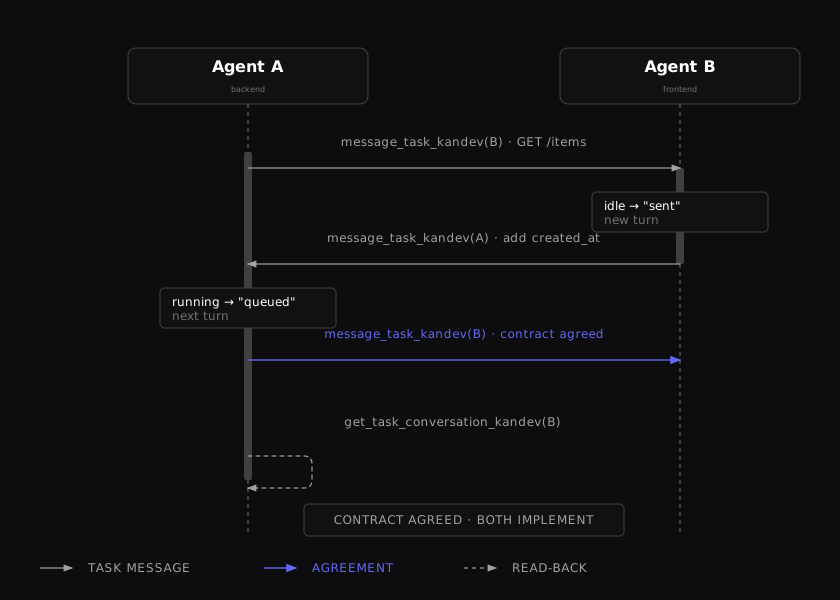

The sequence keeps the state changes beside the messages: an idle recipient is sent a new turn, a running sender queues its next turn, and a final read-back confirms the contract before implementation.
Agent A's actual tool calls (turn by turn)
Turn 1: propose the contract:
message_task_kandev(
  task_id="frontend-task-uuid",
  prompt="""
  I'm Agent A on the backend task (task ID: backend-task-uuid, repo: api, branch: feat/items-endpoint).
  Proposing the following API contract for the /items endpoint:

  GET /items
  Response: { "items": [{ "id": string, "name": string }] }

  Does this cover your frontend needs? Reply with any required changes or "agreed".
  """
)
# → "sent" (Task B was idle)
Turn 2: Task B's reply arrives as a new user turn in Task A's conversation:
# Incoming turn (user message in A's conversation):
# "Need created_at too; ISO-8601 format preferred."

# Agent A accepts and confirms:
message_task_kandev(
  task_id="frontend-task-uuid",
  prompt="""
  Agreed. Updated contract:

  GET /items
  Response: { "items": [{ "id": string, "name": string, "created_at": string }] }
  Format: created_at is ISO-8601 (e.g. "2024-01-15T10:30:00Z").

  I'm starting implementation now. Let me know if anything changes.
  """
)
# → "queued" (Task B was running its own turn)
Turn 3: verify before writing tests:
get_task_conversation_kandev(
  task_id="frontend-task-uuid",
  message_types=["message"],
  sort="asc"
)
# Returns the full exchange; Agent A confirms the agreed spec before writing tests.
What Agent B does
Task B processes each incoming message as a normal turn. When it receives Agent A's proposal, it reads the current frontend component that consumes the API, identifies the missing field, and sends back a specific counter-proposal. When the agreement arrives, it proceeds to implement its API client with the agreed shape.
Good practices
Be self-contained. Each message should include enough context for the receiving agent to act without looking up prior conversation history; task ID, repo, branch, current status, and what you expect in return.
One bounded question at a time. Cross-task messages work best for specific, answerable requests ("does this schema cover your needs?"), not open-ended collaboration. Keep the negotiation short.
Verify before implementing. After reaching agreement, read the other task's conversation with get_task_conversation_kandev to confirm the final state before writing code that depends on it.
Avoid loops. Do not enter an infinite exchange. Agree on a clear stopping condition (e.g. "reply with 'agreed' or a specific counter-proposal") and implement after at most two or three rounds.
Move a task with entry options
move_task_kandev accepts an optional nested entry_options object for a one-time destination exception:
{
  "reset_context": true,
  "instructions": "Start QA by reproducing the failing checkout test.",
  "skip_step_prompt": true
}
Kandev normalizes the object, omits empty optional strings, and validates the destination with its options.
| Option | Effect |
|---|---|
reset_context | Adds a reset. It cannot remove a reset required by the destination step. |
instructions | Adds one instruction block after the normal destination prompt. |
skip_step_prompt | Suppresses the destination prompt and task-description fallback. With instructions, the agent starts a turn with them. Without instructions, the task moves without starting a turn and remains idle. |
disposition: "deferred"means the source session isRUNNINGorSTARTINGand a step change waits for the turn to end. Deferred options persist through the turn boundary, WIP promotion, and backend restart.disposition: "applied"means a step change committed immediately, or the task was already at the requested workflow and step with no entry options. In that same-step case, Kandev returns the stored task without retrying or changing its position.- Every result includes
task. An optioned step change also returnsmove_idand the acceptedentry_options. - The top-level
promptremains an alias forentry_options.instructions. If both are non-empty, validation fails. - Pull-request draft and review status are not generic move options.
No secrets or large dumps. Messages are coordination, not a code-delivery channel. Do not send credentials, private keys, or large file contents through cross-task messages. Reference files by path; share access via the repository, not the message.
Failed/cancelled tasks cannot receive messages. If message_task_kandev returns an error, the target task is in a terminal state. Create a fresh task with create_task_kandev and start over.
Related built-in actions
These tools complement cross-task communication for common coordination patterns. The full MCP surface is documented in Automation and MCP.
| Tool | Use for |
|---|---|
message_task_kandev | Send a prompt to any task by UUID |
get_task_conversation_kandev | Read a task's message history (pagination, type filters); defaults to the primary session |
list_task_sessions_kandev | List a task's sessions to find the session_id for the two tools above |
list_related_tasks_kandev | Discover parent / child / sibling / blocker task IDs |
create_task_kandev | Delegate work to a new subtask; returns the new task's ID |
spawn_session_kandev | Start another session on an existing task; returns {task_id, session_id, state, agent_profile_id}, where agent_profile_id is the effective profile after workflow resolution; use the session_id field to message the new session directly |
move_task_kandev | Hand off a task to a workflow step with optional one-time entry options for the receiving agent |
create_task_plan_kandev | Record an agreed implementation plan (both tasks can create/update their own plans) |
get_task_plan_kandev | Read the whole plan or an exact bounded range using offset/limit; pin later pages with expected_version |
edit_task_plan_kandev | Apply one exact, unique text edit to a reachable task plan |
list_task_plan_revisions_kandev | List bounded metadata for a reachable task plan's history |
get_task_plan_revision_kandev | Read one exact revision before a conditional restore |
restore_task_plan_revision_kandev | Restore a revision after checking current and source versions |
step_complete_kandev | Signal that the current workflow step is done (task-mode only) |
ask_user_question_kandev | Escalate to a human when agent negotiation cannot resolve a question |
For focused plan changes, combine a bounded read with an exact edit or append. Ranges count Unicode code points and preserve the stored text. A partial read is a fragment, so never submit it as a whole-document replacement. See partial plan reads for continuation and conflict handling.
Related: Coordinate Work, Automation and MCP, Tasks and workflows.