Operations
Operate, back up, update, monitor, and recover a local or self-hosted Kandev installation.
Kandev can run as a desktop app, an interactive CLI process, an OS-managed service, or a container. All modes run the same backend and web application. Pick one owner for a given database and workspace root; do not start a second backend against the same SQLite file.
Kandev does not currently provide a user-login boundary for the web application, HTTP API, WebSocket, or external MCP routes. Treat anyone who can reach the backend as an operator. Keep it on a trusted host or private network, or put the entire origin behind an authenticated TLS reverse proxy.
Quick path
- Choose one process owner for the database and Kandev home.
- Check
/readyfor readiness and System > Status for diagnostics. - Back up the database and
master.keybefore upgrades, resets, or recovery work. - Preserve Git branches and external provider state separately from database backups.
Choose an operating model
| Mode | Start and stop | Durable state | Update path |
|---|---|---|---|
| Desktop | Launch or quit Kandev | ~/.kandev by default | Settings > System > Updates uses the signed desktop updater when supported |
| Interactive CLI | kandev, then Ctrl-C | ~/.kandev by default | Upgrade the Homebrew or npm package, then restart |
| Managed service | kandev service {start,stop,restart,status} | ~/.kandev for a user service, /var/lib/kandev for a system service, or the install-time --home-dir | A verified npm/npx user service can select and apply Stable or Nightly; other services use Stable and may require a package upgrade, reinstall, and restart |
| Docker or Kubernetes | Container or workload manager | Mounted Kandev home plus any external database/provider state | Replace the image and recreate the container or pod |
See Desktop app, CLI, Run as a service, Docker, and Kubernetes for mode-specific prerequisites and commands.
Recover sessions after a restart
Kandev automatically checks interrupted sessions at startup and after replacement of a crashed local agent runtime. When retained delivery records agree with the session's saved identity and the original process is proven terminated, Kandev restores the same native conversation without resending its interrupted prompt. Recovery checks continue while Kandev runs, so a temporarily unavailable runtime can recover later. These checks are enabled by default; the Agent Survival feature toggle separately controls whether local agents survive a graceful backend shutdown.
The interrupted prompt's historical outcome remains unknown unless a retained terminal event proves it. Recovery also reconciles a shutdown failure label that lacks terminal evidence with the backend's unknown outcome. It preserves both historical records and repairs missing recovery associations only after verifying the saved conversation and retired work. Missing native state, conflicting records, or an owner whose termination cannot be verified keep the session blocked. Retry connection checks retained evidence without sending another prompt. A successful native Resume clears the matching interrupted notice, including after a page reload, while preserving the conversation history.
If an older crash left journal acknowledgments ahead of saved output, Kandev can restore a verified conversation on a new delivery generation while keeping the missing history explicit. Resume uses the same guarded recovery. A notice remains beside the composer when some earlier output is unavailable; the interrupted prompt's outcome remains unknown. Only a new instruction you send starts new work. Available retained output is synchronized normally.
Recovery remains blocked if the original or replacement process cannot be proven terminated, native state is missing, records conflict, or retained work still needs acknowledgment. An older agent runtime may require an update before Resume can verify a history gap. Backend SQLite commits use FULL synchronization before output acknowledgments so new acknowledgments do not outlive their committed receipts after a power loss.
Prevent host sleep during active tasks
Administrators can open Settings > Preferences > Task Behavior > Runtime and enable Prevent host sleep while tasks run. The install-wide setting is off by default and is saved with the Kandev database. It applies only to the machine running the backend; it does not change executor or node power policy.
When enabled, Kandev holds one host sleep-prevention request while any task
session is STARTING or RUNNING. It releases the request when the last such
session reaches WAITING_FOR_INPUT, IDLE, or a terminal state, when an
administrator disables the setting, and during backend shutdown. Missed session
events are repaired by periodic reconciliation against the session repository.
The request prevents idle system sleep but does not keep the display awake or
override an explicit user sleep action, lid-close behavior, shutdown, low-power
emergency, or another administrator/platform policy. It is supported through
macOS caffeinate, Windows execution state, and Linux systemd-logind over the
system D-Bus. A missing or denied Linux system bus, an unavailable service, or
another native failure is shown in the setting status and never blocks task
execution.
Do not enable this setting by default for Docker, Kubernetes, remote-executor, or always-on deployments. A backend inside a container or pod cannot inhibit sleep on the physical node, and an SSH or other remote executor runs on a different host. Those deployments should use their normal host power and availability policy instead. Enabling the preference is safe when moving the database between hosts: Kandev reacquires a native request only after startup if the new backend can provide it and a working task still exists.
Task Behavior uses Tasks, Conversation, and Runtime tabs on one page. Each setting has a short description. Use its info button for technical details. On touch devices, the info button opens a drawer. Save changes saves drafts across all three tabs.
Health and readiness
Use the top-level liveness endpoint for process supervisors:
curl -fsS http://127.0.0.1:38429/healthIt returns HTTP 200 as soon as the listener accepts connections, with:
{
  "status": "ok",
  "service": "kandev",
  "mode": "websocket+http",
  "version": "1.2.3"
}
/health never returns a non-2xx status while the process is alive, even mid-startup: it confirms the process is up, not that it can serve real traffic. Use the readiness endpoint instead when you need to know the backend can actually serve requests:
curl -fsS http://127.0.0.1:38429/readyIt returns HTTP 503 with status: "starting" (plus the same version) until routes, the agent registry, and the listener are ready, then HTTP 200. During startup, the response also includes a bounded startup object:
{
  "phase": "backing_up_database",
  "elapsed_ms": 42000,
  "phase_elapsed_ms": 18000
}
The phase is a label such as opening_database, backing_up_database,
applying_migrations, initializing_services, or recovering_sessions.
Elapsed values are status measurements, not progress estimates. The launcher
prints phase changes and periodic elapsed status, and names the last phase if
the backend exits before readiness. The supplied Kubernetes liveness probe uses
/health; the readiness probe uses /ready. Both are unauthenticated even
when auth is enabled, so they're also a credential-free way for monitoring to
read the running version; there is no need to authenticate to System > About
just to check what build is deployed.
For application diagnostics, open Settings > System > Status or request:
curl -fsS http://127.0.0.1:38429/api/v1/system/healthThis diagnostic checks the Git executable, GitHub authentication/rate limits, agent discovery, and Linux inotify pressure. It returns a JSON healthy field and issue list, but normally uses HTTP 200 even when healthy is false; do not substitute it for /health in a status-only probe.
Required local persistence has a separate authenticated diagnostic endpoint:
curl -fsS http://127.0.0.1:38429/api/v1/system/diagnostics/persistenceIt reports the database driver, aggregate state, and one sanitized row for each required store. The rows include stable store IDs, state, last check time, and a safe error description. They never include credentials, DSNs, SQL, database paths, or row data.
After startup, a failed required-store probe makes /ready return HTTP 503
with reason: "persistence" and the affected store_ids. Stateful API and
WebSocket requests return HTTP 503 with the stable code
persistence_unavailable and an action to check the database and persistence
diagnostics. A later successful probe restores readiness and stateful traffic
without a process restart. /health remains a pure liveness check and stays
HTTP 200 while the process is alive.
Stats requests have a separate temporary pressure response. When the shared
analytics limit is full for too long, a Stats endpoint returns HTTP 503 with
error_code: "analytics_busy" and Retry-After: 2. This means the analytics
work is queued or timed out while normal reads and persistence probes remain
available. The Stats page retries failed sections and keeps successful sections
visible. If persistence_unavailable appears instead, inspect the persistence
diagnostic because a required store failed its health check.
Local agent runtime recovery
Kandev can replace a failed local agent runtime without restarting the backend. Keep the page open during recovery. Existing route data stays available in the browser. If automatic recovery stops, an administrator can select Retry agent runtime in the alert. This action does not restart Kandev.
After runtime replacement, Kandev automatically reconciles interrupted sessions as described in Recover sessions after a restart. A session remains blocked when termination cannot be verified, retained records conflict, or native state is missing. Use its recovery card to reconnect or stop the original work. Retry connection checks retained evidence without sending the prompt again. A successful native recovery admits new prompts while keeping the interrupted prompt's historical outcome unknown. Stop does not prove cancellation; an unreachable original process still has an unknown outcome.
For a managed service, also check its process manager:
kandev service status
kandev service logs -f
Add --system to both commands for a system service.
Message queue settings
Open Settings > Preferences > Task Behavior > Runtime to manage install-wide queue behavior. The default capacity is 10; 0 means unlimited. Admin saves apply immediately to later admissions. Lowering the limit does not prune rows already waiting. At or above the new limit, only an eligible direct automatic fold into the existing tail can still succeed; other work is rejected until messages run or are removed. Staged attachments are rejected before a fold or claim. Delivery retries for work accepted before the change are not discarded by the lower cap.
KANDEV_QUEUE_MAX_PER_SESSION has higher precedence than the saved capacity. A valid environment value makes only that field read-only; zero or a negative value means unlimited. Invalid text is logged and ignored in favor of the saved setting or default. Environment changes require a backend restart, while UI changes do not.
Automatically merge consecutive messages is on by default. It is the fallback for every session that has not changed its compact Auto-merge queue pill. Untouched sessions follow later global changes. The first per-session change creates an explicit override that survives empty queues and restarts and remains independent for that session's lifetime. An eligible direct admission may fold into the immediate pending predecessor even at capacity because it does not create another row; staged-attachment admissions cannot use this path. Both rows must have the same strict source and compatible task, model, mode, metadata, attachments, and references. Any mismatch or combined limit leaves the new row separate when capacity permits. The earlier row survives and its ID is returned. Turning either setting on does not compact existing rows. This behavior is independent from Enable queued message merging, which controls the manual queue action.
To recover capacity in one session, expand its queue chip in the task workbench. The compact header contains Auto-run and Auto-merge pills beside the count. Remove deletes one visible pending row and Clear all deletes all visible pending rows, including user-, agent-, workflow-, and server-origin work. After removal, merge, or drain, displayed positions immediately compact to #1 through #N; durable FIFO ordering is unchanged. A row already reserved for delivery is hidden and is not cancelled by either action.
State and storage
KANDEV_HOME_DIR relocates the Kandev home. Its default is ~/.kandev; the derived data directory is always <home>/data.
| Path under Kandev home | Contents and recovery significance |
|---|---|
data/kandev.db, -wal, -shm | Default SQLite database and transient WAL files |
kandev.db, -wal, -shm | Legacy default SQLite database checked during startup; Kandev retains it after adoption until you verify the current database |
data/master.key | Owner-only AES-256 key used to decrypt secrets stored in the database; a database copy without the matching key cannot recover those secret values |
data/backups/ | SQLite snapshots when the database uses the default path |
tasks/ and legacy worktrees/ | Managed Git worktrees and per-task files; may contain uncommitted or untracked work |
repos/ | Kandev-managed source clones |
sessions/, quick-chat/, agent-sessions/ | Session history, ephemeral workspaces, and isolated agent homes when used |
logs/ | Service and optional ACP debug logs |
service/ | Owner-only managed-service install metadata plus update intents and helper files |
lsp-servers/, runtime/, workspaces/ | Installed tools and feature-specific materialized state |
plugins/webapps/ | Immutable static web-app release artifacts, required with the database for canvas recovery |
Database snapshots do not contain Git worktrees, clones, the master key, service metadata, or provider-side objects. Native agent and gh login files also normally live in the service user's home outside ~/.kandev (for example ~/.codex and ~/.config/gh). The official container instead sets HOME=/data/home, so those CLI credentials live on its mounted volume.
The Data & Logs > Database tab and its Backups section use the configured SQLite file path. They use backups/ under the parent directory of that file. The default remains <home>/data/kandev.db with snapshots in <home>/data/backups/. A custom path can place the database and snapshots outside the Kandev home. Kandev does not move snapshots from another directory automatically.
Canvas artifacts and recovery
Canvas release metadata, grants, and app state live in the configured database.
Validated web-app files live separately under <home>/plugins/webapps/. The
artifact directory is part of the Kandev-home recovery boundary.
SQLite snapshots do not contain canvas release artifacts. PostgreSQL backups
also need a copy of <home>/plugins/webapps/. A complete Kandev recovery copy
includes the configured database, its matching <home>/data/master.key, and
the matching artifact directory. A cold copy of the complete Kandev home
includes all three.
If a database restore has no matching artifact, Kandev marks the retained release unavailable during startup. It checks the stored digest and path before it serves or runs the app. It does not execute a missing or changed artifact and does not remove it silently. Restore the matching artifact directory. Use the canvas recovery action to reload, roll back, or remove the canvas.
Canvas removal creates an artifact cleanup job before release ownership is
deleted. The worker runs after the database transaction and retries after a
restart. Do not delete <home>/plugins/webapps/ files while their release rows
or cleanup jobs still exist.
Storage maintenance
Destructive: Force clear all permanently removes eligible quarantine entries and discards their restore windows.
Open Settings > System > Storage > Host to inspect Kandev-managed disk usage and configure cleanup. Open Storage > Office retention for Office history policy and status. Analyze is read-only. Run now applies only the enabled cleanup rules and refuses to start while another maintenance run owns the cleanup gate. Cleanup normally waits for active task resources to become idle. If they are active, the page names the work and offers Run anyway after an explicit disruption warning. Use that override only when the active work can tolerate cleanup running alongside it.
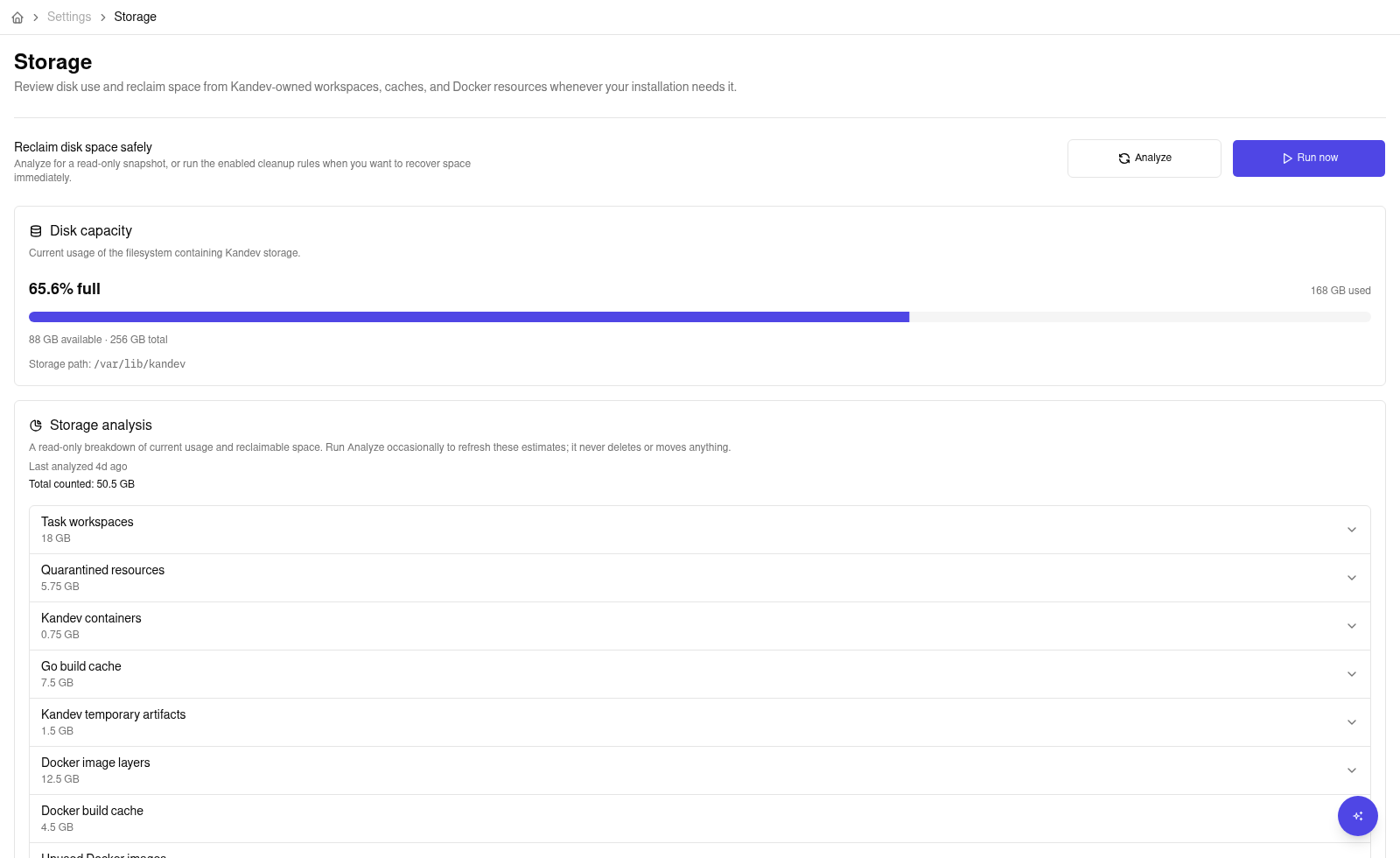
Storage analysis results are cached in the running backend for 15 minutes, so page reloads and policy saves reuse the displayed snapshot instead of scanning disk again. The page shows when that snapshot was last analyzed. The first read can return before the scan finishes. The card then shows which sources are complete and labels the total as Counted so far. When an older snapshot expires, Kandev keeps it visible while the replacement scan runs. A failed replacement also keeps the last successful snapshot and shows the failure state.
Select Analyze to force a fresh read-only scan. The timing information beside the completed snapshot shows the scan duration, the 15-minute cache lifetime, and the next refresh time. A page that remains open requests a new overview at that time. Restarting the backend clears the in-memory snapshot, so the next Storage-page read starts a new scan.
The page also shows the current percentage used on the filesystem containing Kandev's storage, along with used, available, and total capacity. This is host-volume capacity, not just the bytes that Kandev can classify. The card warns at 80% full and uses a critical style at 90%; these thresholds do not trigger cleanup.
The storage analysis total is a classified Kandev total. It does not represent all host filesystem usage. In addition to workspaces, caches, quarantine, temporary artifacts, and Docker resources, the card can show these database resources:
- Database includes the configured SQLite file and existing
-wal,-shm, and-journalsidecars. - Database backups includes regular files in the
backups/directory beside the configured database file. Symlinks are not followed.
The card shows the measured path for each database resource. A measured resource contributes its non-overlapping bytes to the classified total. If another category covers the complete footprint, the row says it is already counted. If categories overlap only in a subtree, the row keeps its full measured size and explains that only the distinct bytes contribute. An unavailable resource is not added to the total and is marked as unavailable. Database rows are not applicable for non-SQLite drivers. During a first scan, pending or active rows show their measurement progress.
Scheduled cleanup is disabled by default. It normally starts only after the configured resource-idle
period. Orphaned task workspaces and eligible temporary artifacts move into Kandev's quarantine
before permanent deletion. Each entry shows its delete_after retention deadline: Delete and
Clear eligible cannot remove it before that time. The deadline is the earliest safe deletion
time, not an exact promise. The first scheduled or full manual maintenance run that reaches the
quarantine provider after the deadline performs the purge. That provider still must pass the idle
gate and avoid preemption. A run that cleans only the Go cache does not purge quarantine entries.
Go-cache cleanup uses a separate policy. When managed-cache use is enabled, new host-local
executions share the selected Go build-cache path. The displayed physical size includes Go's fuzz
corpus, while the cleanup-eligible size and trigger exclude it.
- The configured size is a cleanup trigger, not a quota. The cache can grow between maintenance runs.
- Cleanup permanently deletes eligible build-cache data without a restorable quarantine entry. It
keeps the cache root and ownership marker, and preserves Go's
fuzzcorpus. - Deleted build-cache data cannot be restored.
The Go-cache policy includes an off-by-default Allow cleanup while tasks are running switch. When enabled, Go-cache cleanup skips task-activity and idle-period checks, but it still waits for other maintenance runs to finish. Scheduled cleanup still requires scheduling and Go-cache cleanup to be enabled and the cleanup-eligible size to exceed its trigger. Explicit Go-cache cleanup can also use this setting without a second force prompt.
Other cleanup providers keep their existing admission rules. A build can fail if cleanup removes a file that it needs, and Kandev does not retry the build automatically. A later build can repopulate the same cache path.
Each full maintenance run also revisits at most 100 Kandev-managed local branches retained when a task was archived before its work was integrated. Kandev considers only durable rows that still belong to archived tasks with inactive worktrees; it does not scan branch-name patterns or fetch remote state. The branch is removed only after the same ownership, liveness, and local integration checks used during archive cleanup. Remote refs and branches with unpublished or ambiguous work remain untouched.
Use Clear eligible to remove only entries whose deadlines have passed. It reports protected
entries that remain. Force clear all requires typing DELETE ALL NOW and attempts to permanently
remove every active quarantine entry, discarding restore windows for entries that are successfully
deleted. Safety-validation or deletion failures may leave entries visible and retryable. This
override bypasses only the retention timestamp; path, ownership, state, and filesystem safety
checks still apply.
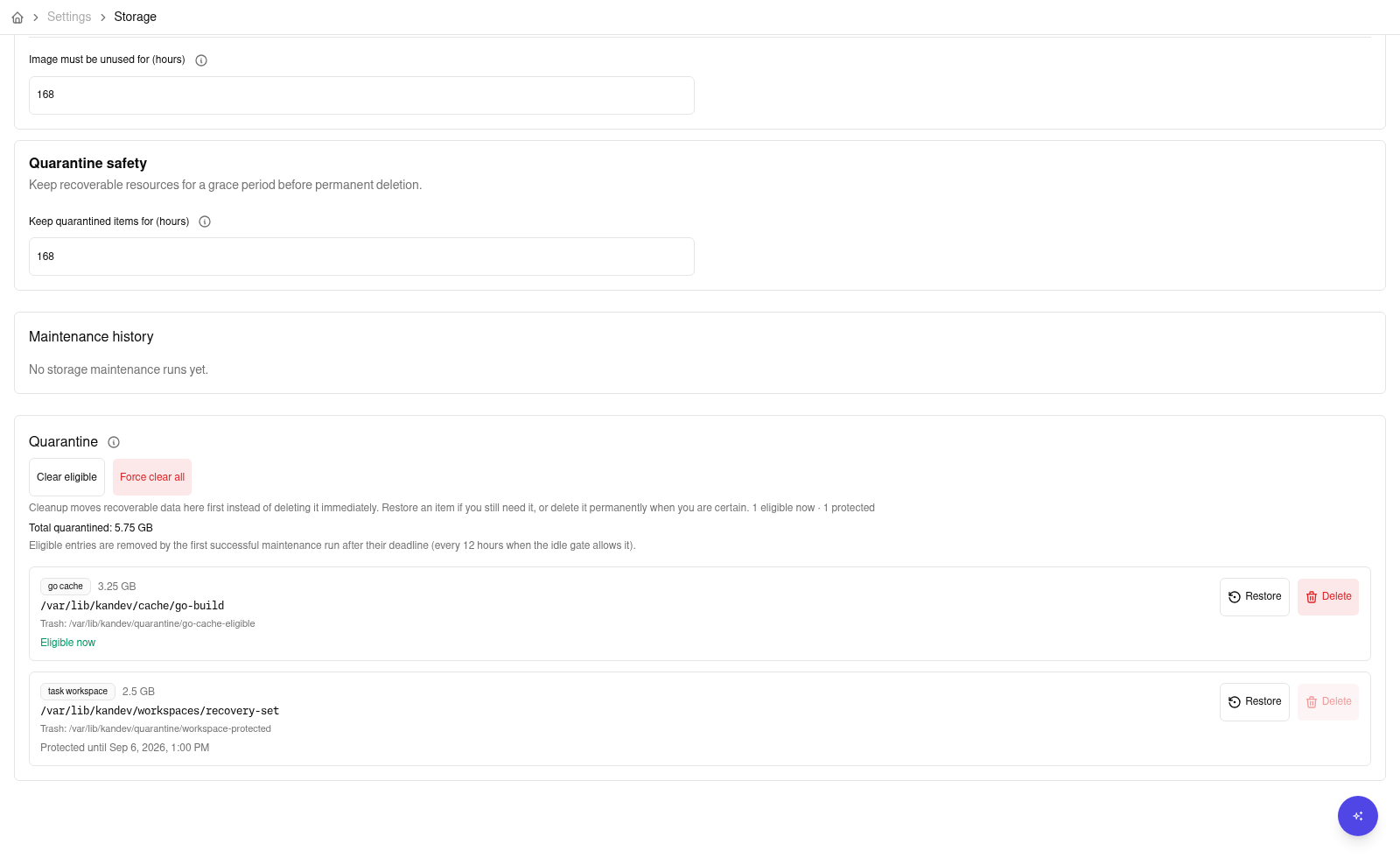
New Go-cache cleanup does not rotate or retain cache generations. Historical Go-cache quarantine entries created by older versions remain subject to their saved retention deadline and the existing restore and deletion safety checks.
If a historical Go-cache quarantine payload is already missing, Delete, Clear eligible, or Force clear all can close its durable entry without changing the live cache. The purge reports zero deleted bytes for that entry. Restore remains unavailable because Kandev cannot prove which cache contents are currently live.
If scheduled cleanup is disabled, no independent quarantine sweeper runs. Use a full Run now or a quarantine action to purge eligible historical entries.
Archived Git worktrees use the task cleanup worker, not the optional storage schedule. A clean worktree can be removed during archive. A worktree with tracked or untracked Git changes remains on disk and gets a durable recheck after about 24 hours. The worker removes it after Git reports it clean, even when scheduled storage cleanup is disabled. Git-ignored files are outside this check. Active archived worktree paths protect their task workspace from storage quarantine and purge, including Force clear all. An older Kandev version can move an active worktree into quarantine. If this happens, choose Restore to return the workspace to its original path.
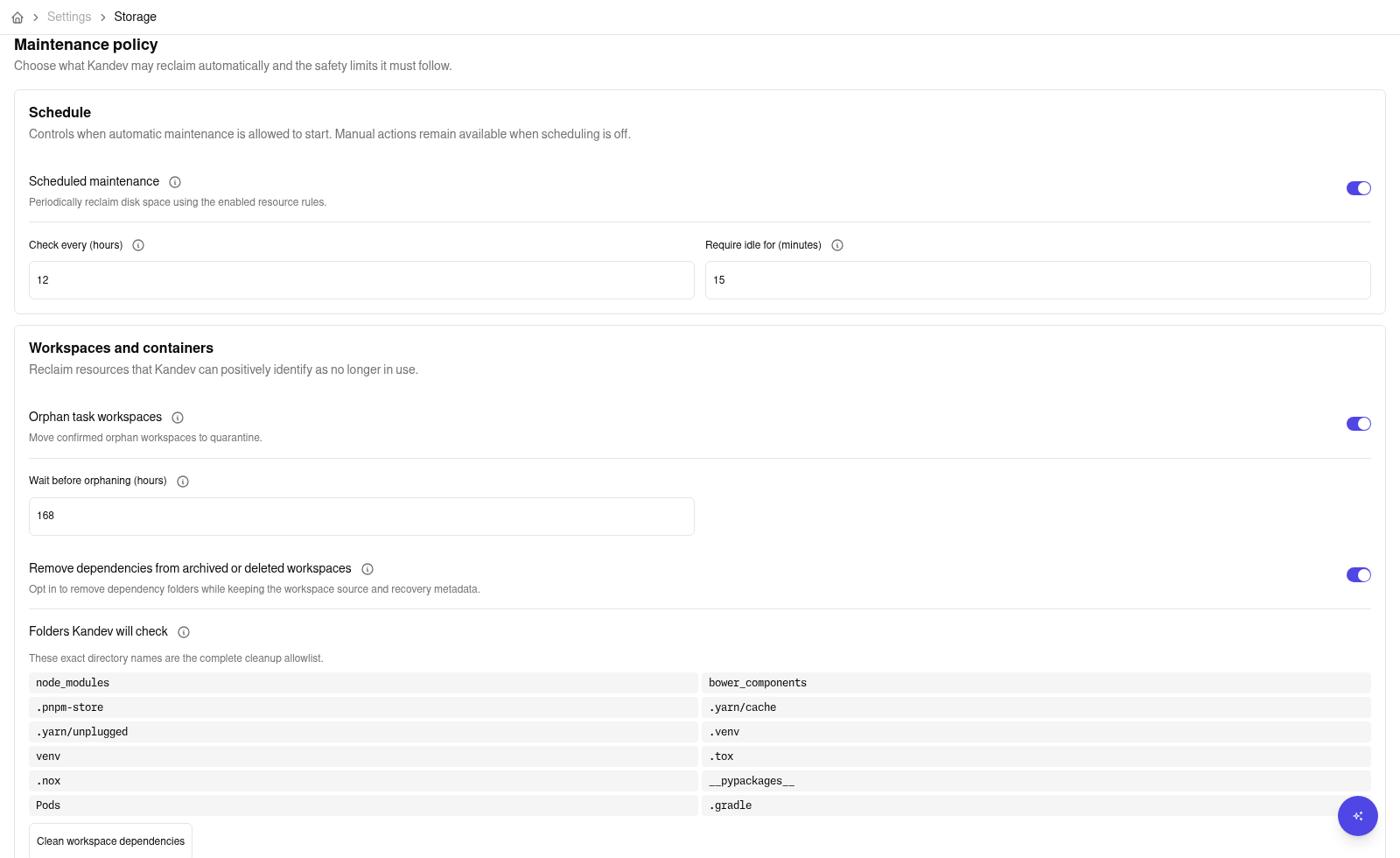
The Workspaces policy includes an off-by-default Remove dependencies from archived or deleted task workspaces option. When enabled, a scheduled cleanup or the matching manual action can recursively remove only these directories from eligible, unprotected Kandev task workspaces:
node_modules, bower_components, .pnpm-store, .yarn/cache, .yarn/unplugged, .venv,
venv, .tox, .nox, __pypackages__, Pods, and .gradle.
The Storage page always shows this exact list next to an information control. Kandev skips missing
directories, never follows symlinks, and does not target ambiguous names such as vendor, target,
build, dist, .cache, or .git. Only archived or deleted workspaces without active or
protected references qualify. This does not change the existing full-workspace lifecycle (seven
days of orphan grace followed by seven days of quarantine retention), and restoring a workspace
after dependency pruning may require reinstalling its dependencies.
Host-wide Docker build-cache and unused-image cleanup remain disabled until you confirm that Kandev owns a dedicated Docker daemon. Do not enable those rules on a daemon shared with unrelated workloads.
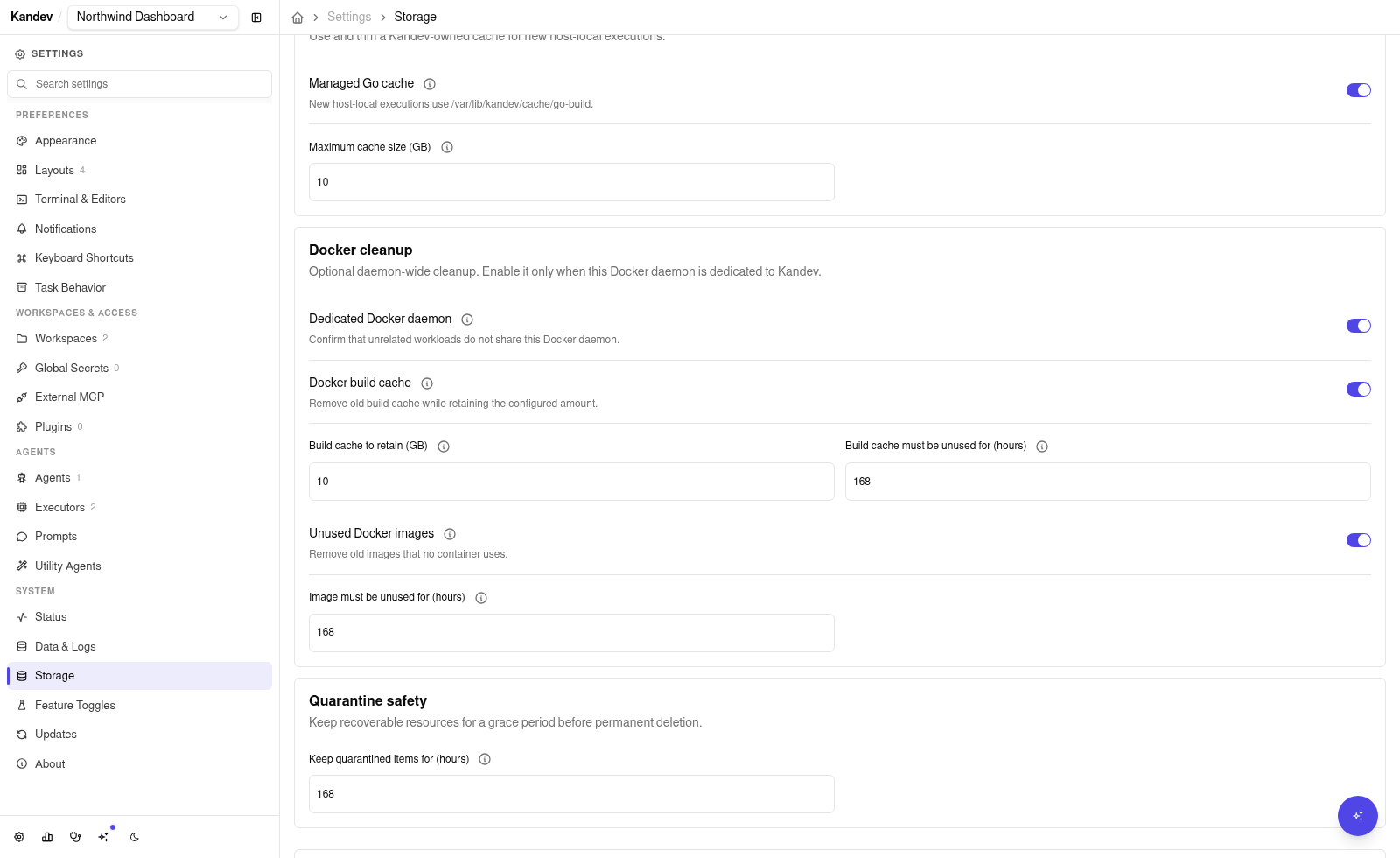
The Host tab reports capacity for the filesystem containing Kandev home and for the service's
effective temporary folder. On Unix, it also reports /tmp when it resolves to a separate root.
Capacity loads independently of the folder analysis and refreshes every 30 seconds while the Host
tab is visible. A warning starts at 80% used; a critical warning starts at 90% used or when no space
is available. Temporary-file operations can fail when this filesystem is full, even if task
workspaces have free space. When Kandev can identify a shared filesystem, the page shows the
relationship and does not add its capacity twice. These measurements do not change temporary
directory or tool-cache settings.
The Storage page also reports System temporary folders as a read-only footprint. It measures the
service's effective temporary folder and, on Unix, /tmp when it resolves to a distinct folder.
Resolved roots, measured size, and partial or unavailable status are shown. This footprint is
informational and can overlap counted categories, so it is excluded from Total counted. It has
no direct cleanup action. The analysis rows use the measured byte
values to order categories from largest to smallest. A decorative bar compares each displayed
measurement with the largest displayed measurement; zero measurements have an empty bar, and
unknown or unavailable measurements have no bar. These bars compare footprints and do not change
Total counted, capacity thresholds, or cleanup behavior. Overlapping categories can therefore
appear in more than one row.
A temporary-folder scan that reaches its deadline keeps the sampled bytes, partial status, and skipped-entry counts. The expanded row shows one timeout explanation and keeps a bounded set of other diagnostic examples. A timeout does not authorize cleanup or indicate that the sampled size is a final folder total.
The expanded System temporary folders row can show up to 20 largest direct entries for each selected root. These sizes are apparent regular-file bytes, not allocated filesystem blocks. Sparse files, hard links, metadata, deleted open files, and reserved blocks can make them differ from the capacity measurement. Partial entries keep only their observed bytes; unreadable or unvisited usage is unknown and is not added to the displayed remainder. Names and sizes identify large paths, but do not identify a task or process. Temporary folders can also contain tool caches, browser profiles, archives, and test data.
An entry is marked as registered only when its exact path matches this installation's artifact registry and its owner-only marker validates. Registration alone does not make a file eligible for cleanup. Review Kandev cleanup opens the existing registered-artifact row, where the current eligibility and confirmation rules remain in effect. It does not start cleanup or pass the selected entry to a delete action. Reported candidate bytes do not predict how much filesystem capacity cleanup will free.
The Host tab separately reports Temporary Kandev files created by services that need a short-lived
directory under the host temporary root. Each current file is registered in the Kandev database
and carries an owner-only marker in its exact directory. Active files and files created within the
last 24 hours are protected. The Clean inactive Kandev temporary files policy is off
by default. When enabled, scheduled maintenance and a full Run now may move eligible, registered
files into Kandev quarantine. Kandev uses a same-filesystem rename when possible. If the
quarantine is on another filesystem, it stages and verifies a copy before publishing it and removes
the original only after revalidating its identity. An explicit Clean inactive files action is
available even when the policy is off. Quarantine entries can be restored during the configured
retention period; this action does not permanently delete them or immediately free disk space.
The action does not inspect or claim arbitrary /tmp entries, shared caches, Node or Playwright
caches, preview/CI/dev-harness directories, temporary data belonging to another Kandev
installation, or legacy /tmp/kandev-agent/* directories. A missing registry or failed measurement
is shown as unavailable rather than as zero usage. The inherited TMPDIR, TMP, and TEMP
behavior below is unchanged.
Host-local agents inherit the Kandev service's TMPDIR, TMP, and TEMP values unchanged. If the
service leaves them unset, agent tools use their normal operating-system defaults; if an operator
sets them on the service, all host-local agents share those configured locations. This permits
tools whose caches are derived from the temporary directory, such as Node or Playwright tooling, to
reuse cache data across agent instances. Kandev does not create a per-instance temporary root or
claim ownership of arbitrary files in the shared temporary directory. On Unix, keep an explicit
service temp path short enough for local Unix-domain socket paths; an excessively long path can
exceed the platform socket-address limit.
Persistent Go build caching is separate: Go's default GOCACHE is not derived from TMPDIR, and
Kandev injects its managed Go-cache location only when that opt-in Storage setting is enabled. If
Kandev cannot prepare that cache for a host-local execution, the agent still starts without the
managed override. This fallback does not change the saved setting or cache data. Go tools then use
an independently configured GOCACHE or Go's normal default; a tool can still fail if that cache
is unusable. Adoption, cleanup, restore, and deletion keep strict path checks and reject unsafe
symlinks.
Scratch cleanup in the inherited temporary directory belongs to the operating system or the host's
temporary-file policy. Archive and delete stop and reap the task's host-local processes, but do not
recursively delete shared temporary files.
Older versions may have left inactive directories under /tmp/kandev-agent/*. Storage analysis and
cleanup do not delete this legacy data by name or age. Remove it only through a deliberate
host-administrator procedure after confirming that no live process references the target; stopping
the Kandev service first provides the clearest maintenance boundary.
Office run history retention
Open Settings > System > Storage > Office retention to manage automatic deletion of old Office run history. Deletion is enabled by default. The first sweep starts five minutes after the backend starts or after you enable deletion.
The first sweep for each history table is a preview. It reports the rows that would be deleted and removes no rows. A later sweep can delete eligible rows. Deletion is permanent. Back up the database before you enable deletion if you need to keep old history outside the configured window.
The retention window controls the age of rows that can be deleted. The minimum per routine and minimum per agent profile controls keep the newest rows for each owner, even when those rows are older than the window. A floor of zero removes this extra protection. Run event, route attempt, and skill rows are deleted with their parent run.
The page shows the current policy, retained row counts, preview results, the last sweep, and any backlog or errors. Counts continue to update when deletion is disabled, so you can monitor growth before you enable it again.
To disable automatic deletion:
- Open Settings > System > Storage > Office retention.
- Turn off Automatic cleanup.
- Select Save changes.
- Check the retention status. It must show that deletion is disabled.
Messages compaction
Open Settings > System > Data & Logs > Database to reduce old tool details in a SQLite database. Message compaction is independent of Office run history retention and is disabled by default. The initial period is three calendar months.
- Set Tasks inactive for to whole weeks or calendar months.
- Select Analyze savings to estimate the reduction before enabling cleanup. Analysis is optional and does not remove message payloads.
- Select Automatic compaction.
- Choose Create backup (recommended) or Continue without backup.
- Select Save changes. A selected backup must finish verification before cleanup starts. If preparation fails, retry it or cancel preparation.
The first cleanup starts after preparation. Later checks run every 24 hours while the backend is running. Compact messages now uses the saved policy. Disabling cleanup stops later batches, but does not restore details already removed.
Activity includes task and session updates and conversation messages. Renaming a task can extend its protection. Recent activity, active or waiting sessions, queued work, and pending input protect a task at any age.
Cleanup retains tool messages, titles, commands, status, timestamps, and useful summaries. It removes supported result bodies and generic tool inputs. Old conversations show when tool details were removed. Human and assistant prose, plans, permissions, todos, and attachment records remain. Unknown formats, protected structured results, and oversized payloads appear in skipped counts. If an eligibility check times out, Kandev keeps that task and reports a partial result. The next daily pass can retry it.
The estimate measures payload bytes. It does not predict a database-file size or backup-duration reduction. Cleanup makes space reusable inside SQLite. Use the separate database compaction action during a quiet period to shrink the file. Existing backups keep their size, and creating a backup needs more disk space.
Removal is permanent within the current database. Restoring a backup replaces the whole database and can remove newer changes. Keep any backup you need before deleting it. Other database engines show this feature as unavailable.
Backend delivery retention
Kandev automatically removes redundant backend transport data on SQLite and PostgreSQL. It preserves canonical messages, tool history, turns, and unresolved recovery evidence. This cleanup is separate from Message compaction and agentctl journal pruning.
The default payload grace is one hour. Eligible projected event payloads and fully settled prompt payloads expire after this grace. Cleanup retains compact identities, hashes, outcomes, and settlement evidence. Independently projected nonterminal output can lose its redundant raw body even when an older terminal is unresolved or legacy submission bookkeeping is missing. Its exact committed projection receipt, authenticated cursor and replay hash must survive. The unresolved terminal and prompt keep their stronger recovery protections. Recent duplicate receipts remain for up to 24 hours or 10000 events per stream. Contiguous retirement checkpoints reject older events without applying them again. A lost ACK uses the persisted projected cursor. Cleanup never resends a prompt or a tool action.
Unprojected events, uncertain prompts, pending claims, and incomplete terminal or workflow settlement remain protected. Archive and Stop preserve this evidence. Explicit deletion retires the session identity and schedules bounded removal of its delivery records. Protected backlog and canonical history can continue to grow. Retention is not a database quota.
Cleanup starts when the background worker starts, without an initial delay. Each batch examines at most 200 candidates and 4 MiB of payload. Background event and settled-prompt batches target at most 50 candidates, respecting lower configured ceilings. Admitted SQL work has a 250 ms deadline. Cleanup checks every phase once per pass, then repeats phases that commit cleanup work or advance discovery through protected candidates, without artificial sleeps between batches. Frontier wrap alone does not repeat a phase. Passes are bounded to five seconds. When productive work remains, the next pass starts immediately; exhausted or busy-only passes wait for the configured idle interval (one minute by default). Errors use bounded retry backoff. SQLite native writer admission can wait through its existing five-second busy timeout after cancellation. Stop joins that work before database closure. The 250 ms deadline is not a wall-clock completion promise during contention. Startup configuration controls grace, replay limits, cadence, and batch size.
Production structured agent_delivery.retention.* logs report aggregate progress, removed bytes, bounded backlog samples, and skip or error reasons.
Development or pprof diagnostics also expose agent_delivery_retention_* counters through /debug/vars.
There is no production metrics endpoint. A bounded sample is not an exact database-wide total.
Unavailable backlog or age values use -1. These counters do not label session identities or contain payloads.
Delivery retention upgrades and rollback
After upgrade, the normal worker revisits eligible historical payloads in bounded batches using its persisted scan frontiers. No session reset or manual bookkeeping deletion is needed. Large backlogs take multiple passes; unresolved recovery evidence and canonical history remain protected.
Preserve a verified pre-pruning backup before the pruning upgrade. Removed transport payloads cannot be restored within the live database.
SQLite version changes create a consistent page-copy snapshot before migration and verify its integrity. Backup copying does not rebuild the database or reclaim free pages; explicit physical compaction remains separate.
Automatic rotation retains only the newest two snapshots. Copy the verified pre-pruning snapshot outside that directory.
PostgreSQL has no automatic upgrade snapshot. Create a pg_dump before the upgrade and verify restoration into an isolated database.
The rollout uses two releases. Release N provides format-1 readers, writers, checkpoints, and deletion fences without a collector. Release N+1 activates pruning only after the actual Release N artifact passes the pruned-database rollback matrix. Release N pauses collection and preserves pending deletion jobs until a forward upgrade. The implementation plan records the artifact digest and required compatibility evidence. Do not treat a pre-retention binary as a supported rollback reader. A rollback to that binary requires a verified pre-pruning backup and loses changes after that snapshot. A restored snapshot cannot prove that external actions did not occur. It never authorizes their automatic replay.
Delivery retention and disk space
Logical removal makes database space reusable. It does not guarantee a smaller file or secure erasure.
SQLite file shrinkage uses the existing Vacuum action or verified offline CLI compaction.
PostgreSQL operators use normal vacuum or autovacuum for reusable space. The worker never runs VACUUM FULL.
WAL, dead tuples, indexes, backups, and retained copies need separate capacity planning.
Backups can still contain payload bytes removed from the live database.
Database operation
Single-owner rule: SQLite uses one writer connection in WAL mode; only one Kandev backend should own the file. Factory reset is destructive and removes managed data after creating a pre-reset backup.
SQLite
SQLite is the default and is appropriate for a desktop, CLI, service, or single-replica container installation. Kandev uses one writer connection and a read pool in WAL mode. Only one Kandev backend should own the file.
Default database continuity and recovery
When no explicit database.path or KANDEV_DATABASE_PATH is set, startup
checks <home>/data/kandev.db and the legacy <home>/kandev.db before it
creates the current default. If only the legacy database is valid, Kandev
creates a validated snapshot at the current path. It retains the legacy
database and its -wal and -shm sidecars. Do not remove the legacy files
until you verify tasks and other required data in the current database.
If the current default has no task history and the legacy default has task
history, Kandev stops before modifying either database and reports both paths.
If inspection or snapshot validation fails, startup also stops before creating
the current database. To recover, stop other Kandev writers, preserve both
candidate databases and all sidecars, then set database.path or
KANDEV_DATABASE_PATH to the database you intend to use and restart. An
explicit path skips legacy discovery. When both defaults contain task history,
Kandev keeps the current default and does not merge the databases. Use a
verified snapshot or a later deliberate recovery procedure to reconcile them.
Open Settings > System > Data & Logs > Database to see database size, WAL size, schema version, path, and the newest modification time among regular entries in the sibling backups/ directory. That timestamp is a filesystem hint, not proof of a valid snapshot: an unrelated or temporary file in the directory can affect it. SQLite exposes three maintenance actions:
Logical storage totals are measured in the background and shown with their last measurement time. During the first scan, the page still shows database details and available maintenance actions. If a refresh fails, the last complete totals remain visible as stale; select Retry measurement when the page offers it. The logical snapshot is held by the backend for 15 minutes and is lost when the backend restarts. The page reports the metadata measurement time separately if the live metadata read could not refresh.
- Optimize runs
PRAGMA optimize. It is quick and updates planner statistics. - Vacuum runs
VACUUM, compacts the file, and reports bytes reclaimed. It can need substantial temporary disk and can block writes, so run it during a quiet period. - Factory reset is destructive and is described below.
These actions run as background system jobs. Closing the browser does not cancel a job. Check the page or logs for its terminal state before starting another maintenance operation.
Conversation history uses the task database as its source. A storage cutover
can remove the retired conversation journal tables and triggers in one startup
migration, after the normal pre-migration backup. The migration is transactional
and safe to retry after a failed attempt. Stop older Kandev backends before the
upgrade; a mixed old and new writer set is not supported. The cutover does not
run VACUUM, so use the existing Vacuum action later if you need to reduce
the SQLite file size.
Compact SQLite after the conversation upgrade
Compaction is an explicit maintenance operation, separate from backup, migration,
and readiness. Startup does not compact the live database. The pre-migration
snapshot uses VACUUM INTO to create a separate backup; it does not shrink the
live file.
- Wait for the upgraded backend to become ready. Check history before proceeding.
- Copy the verified pre-upgrade backup outside the automatic retention directory for rollback. Create and verify a current snapshot to preserve newer work.
- Schedule a quiet maintenance period and pause agent runs. Ensure sufficient free disk space for temporary files, the WAL, and retained backups.
- Open Settings > System > Data & Logs > Database and select Vacuum. Wait for the job to finish before starting other maintenance or resuming runs.
- Check the reported reclaimed bytes,
/ready, and conversation history. Existing backup files are not compacted by this operation.
For offline maintenance, stop every backend that uses the database, including supervised services. Then run the following against the configured SQLite path:
sqlite3 "/absolute/path/to/kandev.db" 'VACUUM;'
sqlite3 "/absolute/path/to/kandev.db" 'PRAGMA integrity_check;'
The integrity check must return ok before you restart Kandev. Do not delete
-wal or -shm files manually. PRAGMA optimize and a WAL checkpoint do not
replace compaction. SQLite documents a worst-case requirement of twice the
original database size in additional free space for
VACUUM.
PostgreSQL
PostgreSQL is an external, operator-managed database. The Database page shows driver, database-level size, and schema version, but hides SQLite path, WAL, backup time, and maintenance controls. Kandev does not take a pre-migration PostgreSQL dump and the System Backups page is not a PostgreSQL backup/restore facility. Use your platform backup policy or pg_dump/pg_restore.
One executable pattern, after setting standard PGHOST, PGPORT, PGUSER, PGDATABASE, and a secure password source such as .pgpass, is:
pg_dump --host "$PGHOST" --port "${PGPORT:-5432}" \
  --username "${PGUSER:-kandev}" --format=custom \
  --file "kandev-$(date -u +%Y%m%dT%H%M%SZ).dump" \
  "${PGDATABASE:-kandev}"
Some releases perform a one-time schema cutover that rewrites ownership tables and drops legacy schema (for example the task-worktree ownership normalization). Before such an upgrade:
- Take and verify a backup. For PostgreSQL use the pattern above. For SQLite, create a manual snapshot from Settings > System > Backups (or
sqlite3VACUUM INTO) and verify it: the automatic pre-migration snapshot is taken during startup of the new binary, so it cannot be verified before the upgrade starts. - Stop all backend writers during the cutover. Do not run a mixed-version fleet across the upgrade; the migration takes a database advisory lock and aborts on lock timeout without changing the schema or data.
- Let exactly one schema initializer run and reach a healthy state before starting additional instances.
If the new binary reports a worktree-ownership conflict and exits, stop the rollout. The cutover is transactional, so the legacy database remains authoritative. Do not delete ownership rows by hand. Start a compatible pre-cutover binary to restore service, or deploy the migration hotfix and retry the upgrade against the unchanged database.
The normalized schema is intentionally incompatible with older binaries. To downgrade, stop all instances and restore the pre-upgrade backup; never start an older binary against a post-cutover database. SQLite restores from the verified manual snapshot created before the upgrade; PostgreSQL restores your verified pg_dump backup.
Switching database.driver does not migrate data. PostgreSQL and shared NATS remove two single-process data constraints, but they do not make Kandev horizontally scalable: WebSocket subscriptions, execution lifecycle/control state, and task workspaces remain process- or filesystem-local. The current product and supplied deployment validate one backend replica only; do not add replicas based on the database and event bus alone.
Upgrading past the canonical PR-watch migration
A release that makes GitHub PR watches task-owned instead of session-owned (see
ADR-2026-08-31-task-owned-pr-watch-identity)
runs a one-time, idempotent, transactional cleanup of github_pr_watches
during SQLite startup, after the existing version-change snapshot described
above. A failed snapshot or a failed migration aborts startup before any
destructive change; a database that has already been migrated, or a fresh
install, skips it entirely. The migration only ever removes duplicate rows
for the same task/repository/branch (keeping the newest check/comment/review
status and any discovered PR number) and rows orphaned by a deleted task or a
detached repository; it never removes normal conversation messages, snapshots,
or plans, and Review-task monitoring survives the originating session's
completion.
To upgrade safely:
- Take and verify a SQLite backup as described above (manual snapshot from
Settings > System > Backups, or
sqlite3VACUUM INTO); the automatic pre-migration snapshot is taken during the new binary's startup, so it cannot be verified beforehand. - Stop all backend writers before starting the new binary; do not run a mixed-version fleet across the upgrade.
- Start exactly one instance of the new binary and let it reach a healthy
state. Check System > Status or
/health, then spot-check a task that has an open pull request and a Review-stage task whose originating session already completed: both should still show a monitored PR. - Optionally, after confirming health, run
kandev maintenance database(dry run first) to review and, if desired, reclaim storage from the superseded rows the migration and prior duplicate polling left behind; see Database maintenance for its full dry-run, execute, compact, and rollback behavior. The maintenance command never deletes ordinary human/agent conversation messages, and its own retention deletes still require an explicit--executeplus a verified backup independent of the migration's own snapshot.
If startup aborts during the migration, the pre-migration snapshot in
backups/ is untouched and the live database was never partially modified:
restore from that snapshot only if you need to run an older binary again,
otherwise fix the reported cause and restart the same new binary; the
migration is safe to retry because it is idempotent.
SQLite backups
Open Settings > System > Backups.
- Click Create snapshot. Kandev runs SQLite
VACUUM INTO, including committed WAL frames, writes into a private temporary directory, then atomically publishes the snapshot tomanual-<nanoseconds>.db. - Wait for the manual row to appear. The browser waits up to 15 seconds; on a large database the backend job can continue after that UI timeout, so reload before retrying.
- Download the snapshot and copy it off the host.
- Back up
<home>/data/master.keywith owner-only access if you need encrypted secrets to remain usable. - If canvases are enabled, copy the matching
<home>/plugins/webapps/artifact directory. - Separately preserve unpushed Git work, executor/provider state, service configuration, and required CLI login files.
- Restore into an isolated instance and verify tasks, workflows, secrets, repository references, and canvas releases before calling the backup tested.
Manual snapshots are never automatically pruned. When the recorded Kandev application version changes, or when a legacy database has user tables but no stored application-version metadata, Kandev takes a pre-migration kandev-<stored-version-or-pre-meta>-<timestamp>.db before repository schema initialization. Snapshot failure aborts SQLite startup, so keep the backup directory writable and leave enough free space. Kandev then attempts to retain the two newest kandev-*.db files, but pruning is best-effort and a failed delete does not abort startup. That two-file retention applies to automatic files, including older kandev-pre-reset-* snapshots; it does not apply to manual-* files. Monitor and delete obsolete manual files yourself.
For a cold copy of the complete default Kandev home on a user-service installation:
kandev service stop
tar -C "$HOME" -czf "$HOME/kandev-state-$(date -u +%Y%m%dT%H%M%SZ).tar.gz" .kandev
kandev service start
Adapt the source for a custom --home-dir. This archive still does not include external PostgreSQL, remote executors, provider objects, or CLI credentials stored elsewhere in the operating-system home.
Restore and recovery
Restore warning: Stop or finish active sessions, relaunch Kandev after restoring, and reconcile worktrees, containers, pull requests, credentials, and other external state before restarting automation. A database restore does not roll those systems back.
Restore a System snapshot
The UI flow applies to the configured SQLite path:
- Stop or finish active agent sessions and preserve unpushed work.
- Open Settings > System > Backups, choose Restore, type
RESTORE, and confirm. - Kandev stops scheduling, active executions, and database-backed workers. It copies the selected snapshot to
<configured-database-path>.new, validates the SQLite checkpoint result, and closes the pool. It then quarantines the configured database and its-wal/-shmsidecars before installing the staged file. If installation fails, Kandev restores the quarantined files. The restore job remains available long enough to reportrestart_requiredbefore process shutdown. - Click Restart Kandev in the success dialog. If automatic restart is unavailable, quit and relaunch Kandev manually. The backend must restart before database-backed work resumes.
- Check
/ready, System > Status, database schema version, secrets, and representative tasks.
Restore does not roll back worktrees or remote/provider state. A database may therefore refer to files, containers, pull requests, or credentials from a different point in time. Reconcile them before restarting automation.
Restore PostgreSQL
Stop every Kandev backend using the database, then follow your database provider's point-in-time recovery process or restore a verified dump. With the standard PostgreSQL environment variables configured, a destructive replacement pattern is:
pg_restore --clean --if-exists --no-owner \
  --host "$PGHOST" --port "${PGPORT:-5432}" \
  --username "${PGUSER:-kandev}" --dbname "${PGDATABASE:-kandev}" \
  kandev-YYYYMMDDTHHMMSSZ.dump
Restart one backend, allow schema initialization to complete, then validate it as a single-replica deployment. Match the restored data with a compatible Kandev version; Kandev has no automatic database downgrade or validated multi-replica operating path.
Factory reset
In Settings > System > Database, click Factory reset, type RESET, and confirm. This is SQLite-only. The job:
- stops the orchestrator;
- creates
<database-dir>/backups/kandev-pre-reset-<unix>.dbbeside the configured SQLite file; - drops every SQLite user table while retaining
kandev_meta; - removes managed
worktrees/,repos/,sessions/,tasks/, andquick-chat/trees; - requires a manual quit and relaunch.
It does not erase the entire Kandev home: backups, master.key, logs, service metadata, installed tools, and external provider state can remain. Pre-reset files cannot be deleted through the Backups delete action, but older automatic snapshots can later age out under the two-file automatic retention policy. Download a recovery copy before further upgrades.
Logs and diagnostics
Open Settings > System > Logs and select Customize bundle to create and
download a diagnostic ZIP. Backend and frontend diagnostic evidence are
selected by default; you can add the allow-listed runtime index, and in debug
mode raw and normalized agent-protocol (ACP) evidence. Adding ACP opens an
explicit session picker, with each session's Kandev task title linked for
identification. The archive has source directories and manifest.json; inspect
the manifest for requested sources, warnings, captured ranges, truncation, and
loss before treating it as complete.
Standard bundles do not read stored chat transcripts, session messages, or agent messages. Backend evidence covers startup, lifecycle, API, executor, and error events; frontend evidence covers bounded browser console errors/warnings and diagnostic toast reports. Incidental text already emitted into a backend/frontend log entry is not automatically redacted, so review the ZIP before sharing. The runtime index contains only allow-listed session status and executor metadata.
ACP evidence is a separate, debug-only opt-in. It is limited to one to ten sessions the caller is authorized to view and may contain prompts, responses, tool calls, file contents, MCP data, environment-derived values, and secrets. Collection is on demand from retained host files or reachable executors; unavailable, expired, invalid, or truncated sessions make the archive partial instead of broadening the request or continuously copying ACP frames.
Every launch writes info and above to <home>/logs/backend-logs.log; normal and debug stdout show warn and above. kandev --verbose also shows info on stdout. kandev --debug records debug events in the file and enables ACP message dumps.
The active backend file accepts at most 16 MiB. Before a new entry would exceed that limit, Kandev closes it as backend-logs-YYYY-MM-DD-NNNNNN.log and opens a new active file. Active and closed backend files use at most 256 MiB in total. Kandev removes the oldest closed segments when needed, so logging continues and high-volume periods keep the newest evidence. Three UTC days is the maximum file age, not a reserved allocation for each day. Same-day restarts append to the active file, and UTC midnight starts a new active file.
The browser keeps a bounded three-day console history locally and sends it only when an authenticated bundle request asks for frontend evidence. Console calls are not continuously uploaded. Error toasts are reported immediately, but automatic reports remove URL query strings and fragments and use count and byte rate limits. A bundle can be partial if no browser responds, IndexedDB is unavailable, queues shed entries, or byte/profile limits truncate data. Ready bundles expire after 15 minutes; one active job per user and bounded global capacity can return 429 or 503. Standard bundles cap backend/frontend/runtime sources at 160/80/2 MiB; ACP-inclusive bundles use 96/48/2 MiB plus 96 MiB ACP, with no budget transfer between sources.
Process-manager logs remain useful for live output:
- Linux service:
kandev service logs -freads the systemd journal. - macOS service: the same command tails
<home>/logs/service.outandservice.err. - Docker:
docker logs -f kandev. - Kubernetes:
kubectl logs -f deployment/kandev.
When reporting an incident, record timestamp/timezone, Kandev version and commit from System > About, task ID, session ID, executor type, repository/branch, and relevant provider request IDs. Bundles can contain install-wide backend events, full browser URLs, console arguments, and stacks; review them as sensitive data before sharing. Agents can request backend, frontend, or all sources and should search a known task ID exactly before broadening. System > Licenses is a generated inventory of shipped npm and Go dependencies, not a runtime health check.
Disk use and environment cleanup
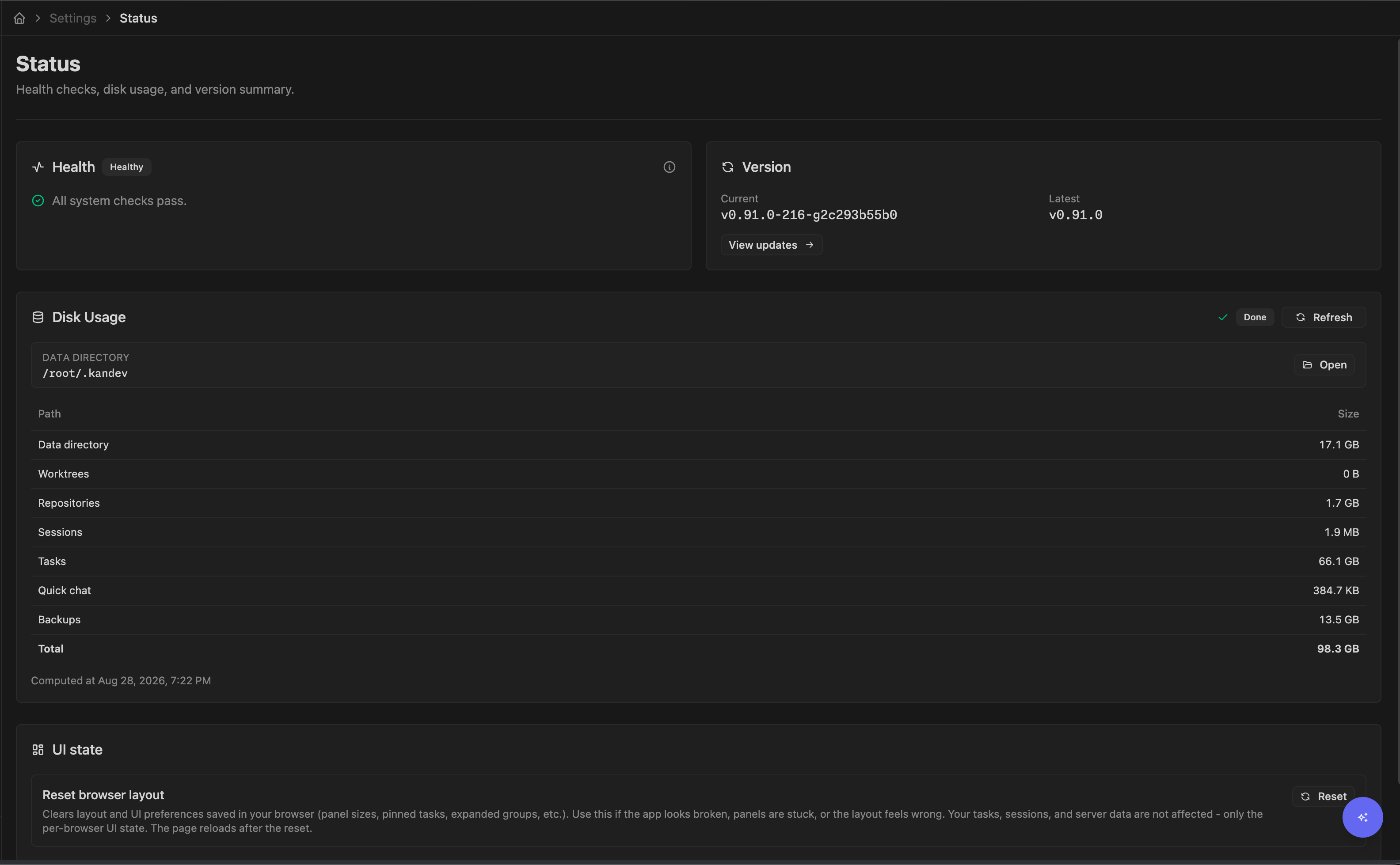
Settings > System > Status walks data, worktrees, repositories, sessions, tasks, quick chat, and the default data/backups directory. Results are cached for two hours; Refresh forces a new single-flight walk. Permission failures appear as warnings. Backup files outside the resolved home are not included in the total. The displayed total intentionally counts data/backups both inside the data row and again as the separate backups row, so use filesystem or volume metrics for quota enforcement.
Archiving or deleting a task stops active sessions and starts durable asynchronous cleanup. Archive removes a Git worktree only when Git reports it clean. A worktree with tracked or untracked Git changes stays on disk and receives a task-lifecycle recheck after about 24 hours. This recheck runs independently of the optional scheduled storage cleanup. When Git reports a worktree clean, Kandev removes its directory. Unpublished and ambiguous local branches remain. Kandev can remove an integrated managed branch. The environment identity remains for later recovery. Delete can also remove the local task branch. Other cleanup can remove a container, the exact Kubernetes Pod, and a Kandev-managed PVC. It keeps an existing claim. It can destroy a Sprite, reap a host-local agent process tree, or stop a remote SSH controller. SSH cleanup removes only the per-session runtime directory. Failed cleanup remains retryable across a backend restart. Kandev does not sweep arbitrary files from the shared temporary directory during archive or delete. The remote SSH task directory and existing Kubernetes claims remain for deliberate cleanup. The task can disappear from the UI before cleanup finishes.
Reset Environment uses a separate teardown path. For Sprites, the current reset request can lose the profile credential context and report success while leaving the provider sandbox behind. After a Sprites reset, inspect Settings > Executors > Sprites.dev and explicitly destroy the old sandbox there if it remains. See Executors for the executor-specific lifecycle.
Before archive, delete, reset, or manual cleanup:
- inspect tracked, untracked, and ignored files in every attached repository;
- commit and push work that must survive, and record its remote branch or pull request;
- stop active sessions;
- use the Kandev action so database and runtime inventory stay coordinated;
- check logs and the remote provider afterward, because timeout, network, or permission failures can leave a container, directory, or sandbox behind.
Never delete a managed task directory merely because its database row looks terminal. A borrowed environment or pending asynchronous cleanup can still own it.
Recover a preserved Worktree inventory mismatch
If a session resume reports that canonical workspace repository inventory is incomplete, first preserve the checkout exactly as it is. Record its branch and HEAD, and inspect tracked, dirty, untracked, and ignored files. Do not use Reset Environment, archive/delete cleanup, git clean, worktree removal, or a provider reset as an inventory repair.
The task-scoped repair_workspace_inventory session recovery action is safe only for a Kandev-managed local Git worktree with exactly one missing or stale repository/branch slot. It performs read-only reciprocal Git inspection, hashes the checkout state, compares current database revisions, rejects another active session, changes only the proven inventory row, appends an immutable receipt identity, verifies the checkout again, durably records monotonic matching post-repair evidence on that receipt, and resumes once through the ordinary validator. Retrying the same operation requires the same idempotency key. See WebSocket API for the request and receipt contract.
Stop and investigate manually when the action returns a conflict. Common causes are multiple unmatched rows, duplicate repository/branch attachments, a moved or symlinked path, a detached or unexpected branch, a missing Git worktree registration, a user-owned local repository, a Docker/SSH/Sprites-only checkout, another active session (including a child sharing the environment), configured external Git clean/process filters, or state that changed during inspection. A conflict is intentionally preservation-first: Kandev leaves checkout files and provider resources untouched and does not fall back to rematerialization.
A fresh or additional-session launch (a brand-new session, spawn_session_kandev, or on-entry auto-start) runs this same guarded repair automatically when it hits the identical single-slot mismatch, using a server-derived idempotency key scoped to that session; no manual action is needed. If automatic repair cannot prove a safe single match, the launch fails exactly as it did before this behavior existed, with no orphaned STARTING/RUNNING session and no primary-session change, and the manual repair_workspace_inventory action above remains available.
If Kandev commits the inventory row but cannot durably store positive post-repair evidence, the launch or resume remains blocked and retryable. Use the same idempotency key for manual retries; Kandev re-inspects the preserved checkout and proceeds only after it records matching evidence. Once divergent evidence is durably recorded, retries cannot replace it with a match; preserve the checkout and investigate manually.
Updates
Stable is the default update channel. It resolves signed releases from the public GitHub Releases
API. A verified Kandev-managed npm or npx user service can select Nightly in
Settings > System > Updates, then use the shared Save changes action. Nightly resolves the
public npm kandev@nightly dist-tag. The install-wide selection survives restart. Desktop,
Homebrew, system-service, unmanaged, local-checkout, unknown, and invalid-metadata installs stay on
Stable and the page explains why Nightly is unavailable.
The backend checks the selected source once at startup and every six hours, with a 30-second HTTP timeout, and persists the last successful Stable and Nightly results separately. Check now performs a synchronous request and permits one manual check per process every 30 seconds. Offline, rate-limited, or registry-failing installations continue to show that channel's cached state.
Nightlies are best-effort daily snapshots. A new version appears only when main contains commits
after the latest Stable release and that exact commit has not already been published. Nightlies do
not move npm latest and do not create Homebrew, Scoop, Desktop, GHCR, Git tag, or GitHub Release
artifacts.
Configure update alerts in Settings > General > Notifications > Notification Events. Select Kandev update available for each notification provider that should receive it: Local delivers the in-app update indication and can use an already-granted browser or native desktop notification; System and Apprise use their configured provider transports. Notification routing is independent of the Stable/Nightly release selector. New Local and System providers include this event by default; existing Local and System providers receive it once on upgrade, while existing Apprise providers remain unchanged. Disabling the event for a provider stops that provider's delivery without disabling release checks. Each provider receives a release version at most once; a later version is a new occurrence. Returning from Nightly to a Stable version is an explicit action and does not produce a normal upgrade notification.
Before any update, finish or stop active sessions, create and export a database backup plus its master key, preserve unpushed Git work, and read release notes.
- Desktop: use Settings > System > Updates when signed updater assets are available; otherwise install the new desktop package.
- Managed npm/npx user service: choose Stable or Nightly, save, check the resolved exact version,
then use Apply update. Apply submits the exact immutable version shown; if a newer channel
target was cached meanwhile, the backend rejects the stale request so the page can refresh. To
recover from Nightly, select Stable and apply the shown release. For terminal recovery, an
npm-managed service runs
npm install -g kandev@latestand thenkandev service installwith the same flags; an npx-managed service runsnpx -y kandev@latest service installwith the same flags. Restart afterward. An npx-managed service points into npm's transient_npxcache and stops working if that cache is pruned; prefernpm install -gfor a durable service. - Managed Homebrew user service: Stable only. Use Apply update when available; otherwise run
brew upgrade kandev, reinstall the service with the same flags, and restart. - System service: Stable only. Upgrade with the required privileges, reinstall with the same service flags, and restart; the UI never applies it.
- Unmanaged CLI: run
brew upgrade kandev,scoop update kandev, ornpm install -g kandev@latest, then restart the process. - Transient npx: start the desired release with
npx -y kandev@latest; this does not update a persistent package. - Docker/Kubernetes: replace the image and recreate the workload. Do not treat an in-container package install as a durable update.
After restart, verify /ready, System > About, System > Status, the database page, and one non-destructive agent session. Kandev does not perform automatic binary or database rollback. If rollback is necessary, restore a compatible pre-upgrade database and matching application release together.
Resource metrics
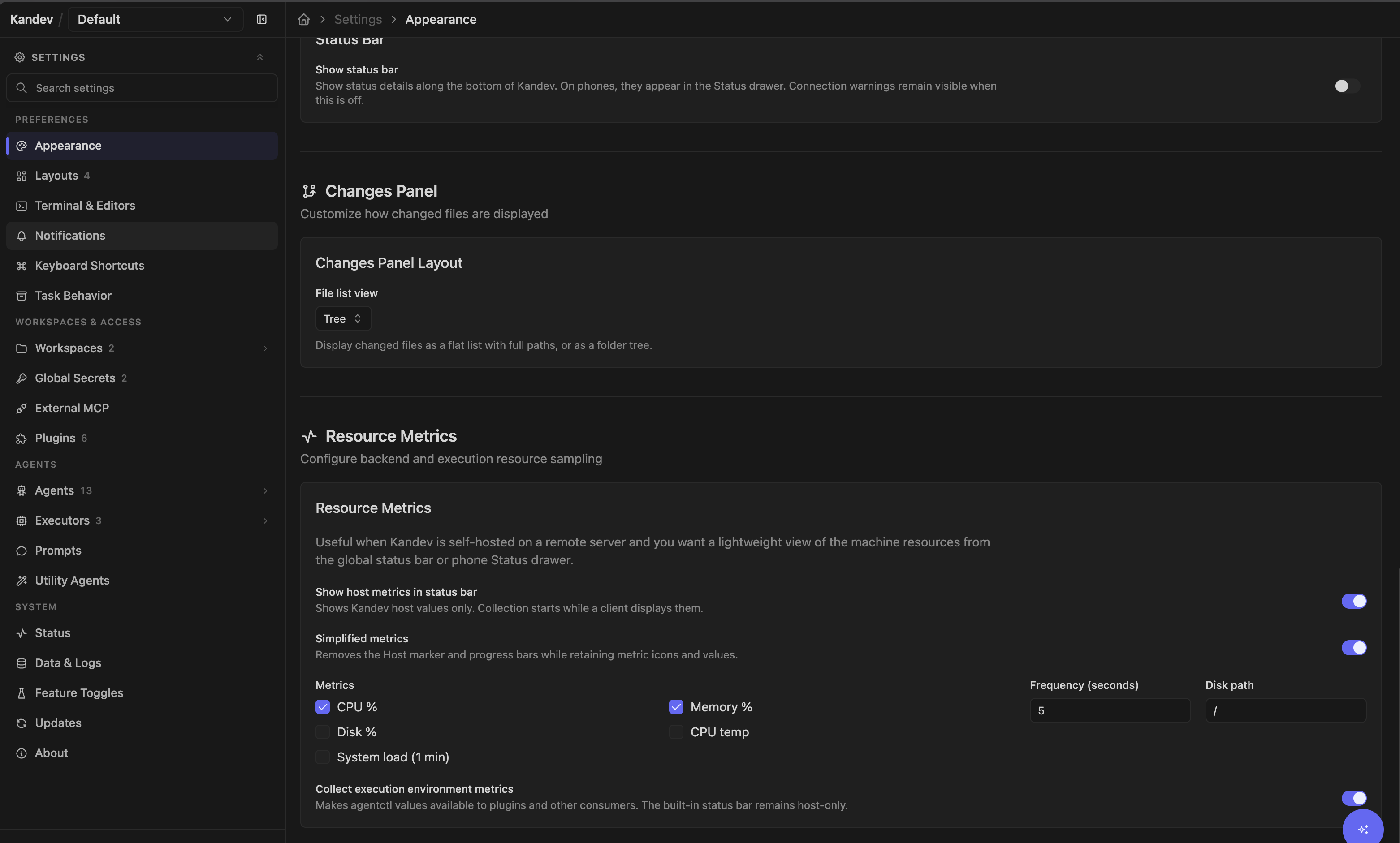
Configure sampling at Settings > Preferences > Appearance > Resource Metrics. Defaults are CPU, memory, and disk percentage every five seconds, backend disk path /, and execution-environment collection off. Valid intervals are 1–300 seconds; at least one of CPU, memory, disk, CPU temperature, or 1-minute system load remains selected. System load is the average number of tasks running or waiting for CPU during the last minute; compare it with the host's CPU core count. Enable Simplified metrics to show only each metric icon and value in the status bar, fallback top bar, or phone Status drawer, without the Host marker or percentage progress bars.
On phones, detailed readings appear together in a System metrics card, with labelled CPU, memory, and disk readings on one row. Additional enabled metrics continue below. Open Status when the status bar is enabled, or Menu when Show status bar is off but host metrics are enabled.
Collection starts only while at least one connected client displays metrics in the status bar, fallback top bar, or an open phone Status drawer. Phone clients subscribe only while their Status drawer is open. The built-in status surface renders the Kandev host source only. Enabling execution metrics also adds active Docker, Kubernetes, SSH, and Sprites agentctl sources to the metrics stream for separately owned consumers such as plugins; execution disk sampling uses /. A provider hook also exists for remote Docker, but creating that runtime currently returns a not-implemented error. Missing platform APIs, container permissions, an invalid disk path, a disconnected executor, macOS/Windows temperature support, or Windows load-average support produce unavailable samples rather than quotas.
These metrics are lightweight UI observability. Set alerts, retention, CPU/memory limits, and disk quotas in the host, container platform, or external monitoring stack.
Status bar visibility
The status surface is off by default for each user. Open Settings > Preferences > Appearance > Status Bar, enable Show status bar, and use the page's shared Save changes action. The portable preference applies immediately without restarting Kandev. It shows a 24 px bottom bar on desktop and fine-pointer tablets; phones use native Status controls and an inset Status drawer.
Turning it off removes ordinary status chrome. Host metrics remain controlled separately by Show host metrics in status bar and move to the existing top-bar fallback when enabled. A saved language-server Status location also falls back to the editor toolbar when the status surface is unavailable. Active WebSocket connectivity warnings remain reachable through the warning-only fallbacks described below.
WebSocket connectivity warnings
Kandev warns when its live WebSocket connection has not recovered for three seconds: yellow means the connection is unstable and reconnecting; after ten seconds the warning turns red, meaning live updates may be stale. The warning clears as soon as the connection recovers. With Show status bar on, it appears in the bottom bar on desktop/tablet and through the existing Status controls on phones. When the preference is off, an active warning still appears beside the sidebar theme control on desktop/tablet and opens a connection-only Status drawer on phones.
Feature toggles
Settings > System > Feature Toggles currently exposes:
- Office mode: experimental, medium risk, and off in the production profile by default.
- App status bar: stable, low risk, and off in the production profile by default. Enabling it adds the desktop/tablet bar and phone Status entry after restart; disabling it again does not stop connections, metrics collection requested by other clients, or plugins. Urgent WebSocket connectivity warnings still remain visible while the feature is off.
- Claude background prompt handoff: experimental, high risk, and off in every profile by default. Enabling it lets Claude Code accept another prompt after its foreground yields while recognized async subagent,
run_in_backgroundshell, or Monitor work remains active. ACP lifecycle gaps can misclassify activity or overlap prompts; use it only for controlled testing. - Unread divider: a per-user setting at Settings > Preferences > Task Behavior > Conversation. It defaults off, takes effect immediately, and controls both the Slack-style New divider and read-cursor updates while that user's transcript view is visible.
- Debug mode: high risk; enables diagnostic endpoints and agent-message logging that can contain sensitive content.
Office session identity is graduated and always active. Each Office participant
uses its own task conversation, and an agent decision is evaluated against the
calling session. A live (task_id, agent_profile_id) pair is guarded
in-transaction on the Office session creation path; pre-existing duplicate rows
are retained and resolved by selection. Two Kandev processes must not write
the same SQLite file. Its runtime toggle and environment variable are retired,
so old false values do not disable participant sessions.
Each feature toggle requires restart. A value supplied explicitly by its environment variable locks the UI control; the debug toggle is also locked by explicit legacy/debug-message environment variables. Otherwise the UI stores an override in the database. The page can request restart only when the native local supervisor is available. A normal Unix kandev terminal launch is supervised; Desktop, a service, a container, a directly started backend, a deploy preview, or Windows requires a manual application restart.
Status-bar layout is a separate per-user preference. Hold Cmd on macOS or Ctrl elsewhere while mouse-dragging an item to move it across the desktop/tablet bar. The backend preserves the layout across reloads and restarts; the phone Status drawer mirrors it as the saved left sequence followed by the saved right sequence.
Troubleshooting
| Symptom | Check | Action |
|---|---|---|
/health cannot connect | Process-manager and launcher output | Confirm port ownership, database reachability, writable Kandev home, and required executables; then restart once |
/ready stays at 503 while /health is 200 | Backend startup logs | Process is alive but still wiring routes, seeding the agent registry, or mounting test-harness routes; give it more time before restarting |
Status page says unhealthy while /ready is 200 | /api/v1/system/health issue IDs | Fix Git, GitHub, agent discovery, or Linux inotify warning; readiness and application diagnostics have different meanings |
Stats returns analytics_busy | Stats response code and Retry-After header | Wait for the bounded retry or select Retry in the failed section. If pressure continues, reduce concurrent Stats loads and inspect backend logs |
Stateful reads return persistence_unavailable | /api/v1/system/diagnostics/persistence | Check the affected store and database health. This is a required-store failure, so resolve it before treating the incident as temporary analytics pressure |
| Backups page reports a 15-second create timeout | Reload the backup list and inspect the backup-create job/log | Large VACUUM INTO jobs can still finish; avoid double-clicking and ensure free disk |
| Backup/maintenance fails on PostgreSQL | Active driver on Database page | Use pg_dump, provider snapshots, and PostgreSQL maintenance; System backup/vacuum/reset is SQLite-only |
| Restored data looks stale | Whether the backend was restarted immediately | Quit/restart; do not keep using the old open database connections |
| Diagnostic bundle is partial | manifest.json warnings, source status, and loss counters | Keep a Kandev browser open for frontend capture; use backend-only when browser evidence is unnecessary |
| Update check returns HTTP 429 | Time since last Check now | Wait at least 30 seconds; background checks retry every six hours |
| Apply update is absent | Install mode/method and <home>/service/install.json | Expected for system, unmanaged, local-checkout, or invalid-metadata installs. A managed npm, npx, or Homebrew user service should offer Apply; reinstall it with the same flags to refresh its identity and metadata, or use the manual package-manager flow. |
| Nightly is disabled | Install mode/method and <home>/service/install.json | Expected unless this is a verified managed npm/npx user service. Homebrew, Desktop, system-service, unmanaged, local-checkout, invalid-metadata, and unknown installs are Stable-only. |
| Nightly check or save fails | npm access and cached checked time | Verify access to https://registry.npmjs.org/kandev, retry after connectivity returns, or keep/select Stable. A malformed or missing npm nightly tag fails closed. |
| Metrics show unavailable | OS support, disk path, executor connectivity | Select supported metrics and verify permissions/network; the collector reports errors per sample |
| Disk total exceeds filesystem expectation | Separate data and backups rows | Backups are counted twice in the UI total; use volume metrics for capacity decisions |
Legacy /tmp/kandev-agent/* uses disk | Process inventory and open-file references for the exact directory | This is data from older Kandev versions, not a current Storage resource. Stop Kandev, confirm no live process references the target, then remove only the confirmed-inactive legacy directory through host administration. |
| Archived task's remote resource remains | Backend, Docker/Kubernetes/SSH/Sprites, and provider logs | Cleanup is asynchronous and bounded. SSH task directories and existing Kubernetes claims are retained by design; for other leftovers, verify work is preserved, then remove the exact resource manually |
| Sprites reset removed the environment but not the sandbox | Settings > Executors > Sprites.dev | Current reset can omit the provider credential during destroy; find the old Kandev-named sandbox and destroy it explicitly |
Related pages
- Configuration; paths, database, logging, NATS, Docker, and security-sensitive environment variables
- Executors; runtime lifecycle, credentials, cleanup, and isolation boundaries
- Git operations; branches, worktrees, push, and pull-request behavior
- Automation and MCP; external MCP authentication and deployment trust boundaries
- Windows support; Windows-native limitations and supported alternatives